Play Together: Friends & Party
- 4.2
- Rating
- 10.00M
- Installs
- Free
- Price

 Analysis by App-foxy
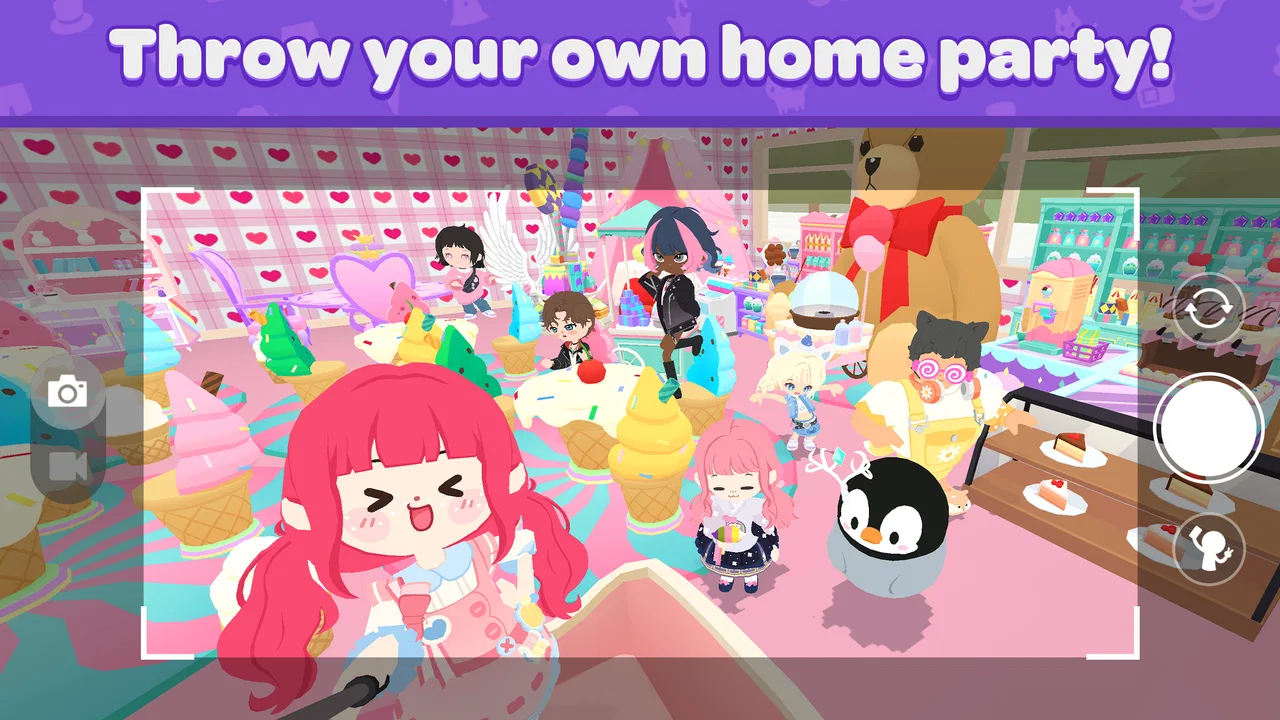
I found Play Together: Friends & Party most enjoyable when I treated it as a shared digital hangout rather than a game I had to master. It comes from HAEGIN Co., Ltd. and mixes casual activities, social spaces, decorating, and small moments of progression into one colorful experience. The store summary says “Decorate, Connect, Play Games!”, but my impression is a little more specific: this is a place to spend short, relaxed sessions with friends or household members, especially when everyone wants something lighter than a competitive multiplayer title.
That distinction matters. You are not downloading a focused puzzle game with one central mechanic, nor a deep role-playing adventure built around long sessions. Instead, the appeal comes from moving between activities, personalizing a space, and seeing what other players are doing. I can imagine opening it after dinner, letting someone else choose the next activity, and spending twenty minutes wandering around rather than following a strict objective. It is free to start, rated Everyone 10+, and has attracted a 4.2 average from around 2.2 million ratings, which gives a useful sense of its broad reach without making it automatically right for every player.
How it works as a shared household game
The strongest household use case is informal turn-taking. One person may care about decorating, another may prefer the playable activities, and someone else may simply enjoy customizing a character and looking around. Because the experience is divided between social interaction and casual games, a shared device does not have to serve one single type of player. That variety is more valuable than it first appears: it reduces the argument over whether the next session should be creative, competitive, or exploratory.
You May Also Like

 Blood Strike: 2.5 Anniversary
Blood Strike’s Loadouts Turn Every Drop Into a Tactical Gamble
A close look at Blood Strike’s custom loadouts: how fast access to signature weapons reshapes its battle royale rhythm, rewards preparation, and narrows the gap between fights.

 Pandora - Music & Podcasts
Pandora’s Music Is Easy to Start, but Harder to Recover
Pandora’s strength is its low-effort path from a seed to a station. Its weak spot is how much confidence it asks you to place in connection, setup, and quiet recovery.

 8 Ball Pool
 Is Built on Rivalries, Rematches, and Routine
A close look at the rivalries, rematches, shared routines, and unanswered safety questions that turn a quick pool match into a persistent mobile community.

 Samsung Music
’s Quiet Strength Is Playing What You Already Own
Its reach comes less from spectacle than from dependable access to a personal library. That simplicity is both the app’s strongest retention engine and its ceiling.

 AccuWeather: Weather Radar
AccuWeather Review: A Quick, Clear Forecast for Everyday Decisions
For everyday plans, the best forecast is the one you can understand quickly. AccuWeather makes rain timing, radar, and local conditions easy to act on, with a few trade-offs.

 Hill Climb Racing
Why Hill Climb Racing Still Turns Crashes Into One More Run
A tiny car, a bumpy hill and one more upgrade: Hill Climb Racing keeps resurfacing because its simple chaos makes every near-miss feel personal.
More From Our News Desk
View All News


I would use it in short blocks rather than presenting it as a game for a long family tournament. A younger player can make choices about appearance or decoration, while an older player can help with navigation and explain what different areas are for. Then the device can be passed along for a quick activity. The handoff works best when everyone agrees beforehand that the goal is to explore and have fun, not to preserve one person’s uninterrupted progress.
There is also a social advantage to having a game that does not demand constant high-level performance. If one household member is not comfortable with fast controls or complicated menus, they can still participate in the broader world. That makes it more approachable than many action-focused multiplayer games. On the other hand, the open-ended structure can feel unfocused to somebody who wants a clear campaign, a strong story, or a definite finish line.
For a shared tablet or phone, I would establish whose session is active before launching it. The game is much easier to enjoy when players do not casually alter another person’s character, room, or choices. This is not a criticism of the game itself; it is simply the practical consequence of using a personal, persistent game as a communal activity. A quick verbal rule such as “look first, change only your own things” prevents most of the friction that can turn a relaxed session into an argument.
What the first session feels like
The initial appeal is visual and social. Rather than asking me to learn a dense system immediately, it encourages me to look around, see what can be customized, and discover the available activities. That gentle entry suits casual players who may be put off by a large tutorial or a serious competitive ladder. I could hand the device to somebody unfamiliar with the game and explain the basic idea without needing a long preparation speech.
My practical advice is to resist trying to understand every option at once. Start by learning how movement, interaction, and the main activity choices work. After that, spend time on decoration or social exploration. This order makes the game feel less cluttered because you first gain a sense of place, then begin making it personal. Players who immediately chase every reward or menu option may find the experience busier than it needs to be.
A useful household routine is to let each player choose one small goal for the session. One person can explore, one can decorate, and one can select the next game. This creates structure without turning a casual title into homework. It also reveals who actually enjoys which part of the experience. In my view, that is one of its less obvious strengths: the game can support different kinds of participation without requiring everyone to like the same feature.
Keeping accounts and progress separate
Shared use needs clear boundaries because a character, customized space, and personal progress represent an individual player’s time. If several people use the same device, I would avoid treating one game session as a communal save file unless everyone genuinely wants that arrangement. A child may see a decoration as a toy to rearrange, while an adult may see it as a carefully assembled space. Those are different expectations, and the game cannot resolve that conversation for you.
I would also make the store-payment boundary explicit. The game is free, but it includes optional purchases ranging from $0.99 to $99.99 per item. That is a wide enough range that nobody should assume every tap is harmless simply because there was no purchase required to begin. Before sharing the device, I would agree on who may open purchase screens and whether any transaction requires permission from the account holder.
This is especially important when a child is exploring independently. The age rating of Everyone 10+ is useful context, but it should not be treated as a substitute for household supervision. Age labels describe the intended content context; they do not know whether a particular child understands online interaction, recognizes a purchase prompt, or can stop playing when asked. I would explain those boundaries before handing over the device, not after an unexpected change or charge.
Another small but valuable habit is to check the active player before changing a room or starting an activity. In a household, the most common problem may not be difficulty or performance; it may be confusion about whose progress is being used. If the game is installed on a shared device, a simple naming convention or a spoken handoff can make the experience feel much more organized.
Coordinating play without making it feel like a chore
The social design works best when coordination stays lightweight. I would not schedule every session or expect everyone to be online at the same time. Instead, the game is suited to quick invitations, short shared activities, and casual decisions about what to do next. That makes it a reasonable option for friends or relatives who want interaction without committing to a long match.
The trade-off is that social freedom can create uncertainty. If you prefer a game that tells every player exactly where to go, what to complete, and how to measure success, this may feel loose. I sometimes enjoy that freedom, but I also notice that it can make a session lose momentum. A good workaround is to choose a simple theme: decorate one area, try a few activities, or spend the session exploring. Giving the session a small purpose keeps the open structure from becoming aimless.
For younger household members, an older player can help with coordination without taking over. Let the child decide the destination or decoration style, while the adult handles confusing menus only when needed. This preserves the feeling that the child is playing rather than being carried through the game. It also helps reveal whether the controls are genuinely comfortable for that player or merely manageable with assistance.
For friends, the game is better as a relaxed conversation companion than as a test of skill. I would choose it when the group wants to compare creative choices, wander, and laugh at small moments. I would choose a dedicated competitive game instead when everyone wants precise rules, balanced matches, or a clear winner. That comparison is important because “multiplayer” does not automatically mean the same thing across games. Here, the social atmosphere is part of the product, not just a feature attached to a conventional contest.
Age, trust, and the online context
The Everyone 10+ rating makes the game a plausible choice for older children and mixed-age households, but I would still introduce it deliberately. The combination of social spaces, player interaction, and optional spending means a child may need guidance even if the game looks bright and welcoming. I would explain not to share personal details, not to follow pressure from strangers, and to ask before making any purchase. Those are sensible rules for any connected game, and they are particularly important when a child is using a shared family device.
I would also pay attention to how a child reacts to the game’s social side. Some players enjoy seeing other people and expressing themselves through customization. Others become frustrated when they cannot control what happens around them or when they compare their progress with somebody else’s. In the latter case, a more contained single-player casual game may be a better fit. The presence of a friendly visual style does not guarantee that every child will find the social environment comfortable.
Trust works both ways. Adults should explain the limits clearly, but they should also avoid turning every session into surveillance. A shared rule about purchases, personal information, and respectful interaction is more useful than vague warnings. I would start by playing alongside the child, then gradually allow more independence if the child understands the boundaries. That approach gives the adult a realistic view of how the game is being used instead of relying only on the age label.
Performance and device comfort are worth considering as well. The current version is 2.30.0 and requires Android 8.0 or later, so older devices running earlier software will not be suitable. On a compatible device, I would keep expectations realistic: a game built around social spaces and visual customization may feel more comfortable on a larger screen, while a phone is more convenient for quick sessions. If the device is shared, charging and storage habits can matter just as much as the game itself.
Where it stands beside other casual games
Compared with a traditional match-three or endless-runner game, this offers more variety and a stronger sense of place. Those alternatives are often easier to understand in seconds and may be better when I have only a minute to spare. Play Together asks me to engage with a broader world, so its reward is not just completing a round. I get more room for social play and personalization, but I also accept more menus, more decisions, and a less direct route to satisfaction.
Compared with a dedicated virtual-world game, it feels more approachable because the casual activities give the session something concrete to do. A purely social world can be enjoyable for players who love self-expression, but it may leave others wondering what the point is. Here, the mix of games and decorating gives different household members a reason to participate. The compromise is that no single part may be as deep as a specialist game built around only decorating, only competition, or only long-term role-playing.
Compared with a local pass-and-play title, it is less tidy as a shared-device experience because personal progress and online interaction introduce more boundaries. A simple local game is often the safer choice when the goal is a quick, supervised family contest with no account confusion. I would choose this one when the household wants an ongoing social space and is willing to agree on how the device, progress, and purchases are handled.
The free entry point is another practical advantage, especially when a family is still deciding whether the style suits everyone. At the same time, the optional purchase range means I would not let a child explore payment screens without an adult’s agreement. The game can remain enjoyable without spending, but the household should make that decision consciously rather than assuming “free” means there are no financial considerations.
Small habits that make the experience better
My first tip is to separate creative sessions from activity-focused sessions. When I try to decorate and explore everything at the same time, the game can feel scattered. Choosing one purpose makes the session calmer and gives a shared group something specific to talk about. This is particularly useful on a family device, where each person may have only a few minutes before passing it on.
My second tip is to use the game as a conversation starter rather than a test of who plays best. Ask a child why they chose a particular look or room arrangement, or let each friend suggest the next activity. That shifts attention away from progress comparisons and toward decisions everyone can understand. It also gives less experienced players a meaningful role.
My third tip is to set the spending rule before the game is opened. Because the available purchase amounts cover both very small and much larger optional items, “ask first” is clearer than “be careful.” If several people use one device, the rule should apply equally to everyone. That prevents the common situation where one person assumes a tap is part of play and another discovers the consequence later.
My fourth tip is to treat the game’s social features as something to learn gradually. Begin with people you know or with a supervised session, then decide whether broader interaction is comfortable. A child who enjoys decorating may not be ready for every social situation, while an adult may be perfectly happy using the game mainly for customization. The best experience comes from matching the social exposure to the player, not from assuming the same setting suits the whole household.
Who should play and who should skip it
I recommend it to players who like a blend of decorating, casual games, and social exploration. It is especially suitable for households that want one colorful title with several ways to participate. Friends who prefer relaxed sessions may also appreciate it because nobody has to be an expert before joining in. The large audience—more than ten million installs—fits that broad, accessible character, although popularity alone should not decide whether it belongs on your device.
I would be more cautious about recommending it to someone who wants a focused challenge, a story-driven campaign, or a completely offline experience. Players who dislike optional purchases appearing in free games may also prefer a paid title with a simpler financial model. Likewise, people who need strict account separation on a shared device should establish their rules first or choose a game designed specifically for local shared play.
There is a particular kind of player for whom this will either click immediately or not at all: someone who enjoys making a virtual space feel personal. If decoration and self-expression are satisfying, the broader structure gives you reasons to return. If those activities feel like distractions from “real” gameplay, the same structure may seem slow. I would not try to convince the second group that it is secretly a competitive masterpiece; its charm is more social and flexible than intense.
My household verdict
After using it as a casual shared activity, I see Play Together: Friends & Party as a good fit for households that can set simple boundaries around accounts, purchases, and online interaction. Its biggest success is variety: one player can decorate, another can explore, and another can join a casual activity without the game becoming inaccessible. That makes it more adaptable than many narrow casual titles.
Its limitations are equally clear. The open-ended design can feel unfocused, social play requires sensible supervision, and the free model includes optional purchases that deserve adult attention. I would not install it expecting a private, tightly controlled family game or a demanding competitive experience. I would install it for relaxed evenings, short creative sessions, and friendly exploration on a compatible device.
HAEGIN Co., Ltd. has made something broad enough to appeal to different players, and the 4.2 average from millions of ratings suggests that the approach works for a substantial audience. My recommendation is conditional but positive: try it when your household wants a shared virtual place with several casual things to do, agree on who controls each account, and decide the purchase rules before anyone starts tapping. With those expectations in place, it is a welcoming way to play together without demanding that every person enjoy the same kind of game.
FAQs for Play Together: Friends & Party
01What is Play Together: Friends & Party?
Play Together: Friends & Party is a casual social game where you create and customize an avatar, explore a colorful virtual world, complete activities, decorate your home, and interact with other players. It combines mini-games, role-playing, collection features, and online social experiences, making it suitable for players who enjoy relaxed gameplay rather than a single, linear adventure.
02Can I play Play Together: Friends & Party with friends?
Yes. The game is designed around online interaction, allowing you to meet friends and other players in shared areas, participate in activities, visit spaces, and enjoy mini-games together. Because many features depend on an internet connection and communication with other users, parents should review the available privacy, chat, and interaction settings before allowing younger players to use the social features.
03Does Play Together: Friends & Party require an internet connection?
An internet connection is generally required for the main experience because the game includes online worlds, multiplayer activities, events, account synchronization, and social interaction. Some menus or previously loaded content may open briefly without a stable connection, but offline play should not be considered a complete alternative. A reliable Wi-Fi or mobile data connection is recommended.
04Is Play Together: Friends & Party free to download and play?
Play Together: Friends & Party can generally be downloaded and played for free, but it may include optional in-app purchases. These purchases can provide virtual currency, cosmetic items, outfits, decorations, or other convenience-related content. The core game offers plenty to explore without paying, although progression and customization may encourage spending. Check your device’s purchase restrictions, especially for children.
05Is Play Together: Friends & Party safe and suitable for children?
The game has a bright, friendly presentation and simple activities that can appeal to children, but it is also a social online title with interactions involving other players. Chat, usernames, user-generated behavior, advertisements, and in-app purchases deserve attention. Parents should use available parental controls, limit spending, discuss online safety, and supervise play where appropriate, since the experience may vary depending on public interactions.
Pros
- Large open world with plenty of activities beyond the main mini-games.
- Easy-to-learn controls make it accessible for younger and casual players.
- Regular events and seasonal content help keep the game feeling fresh.
- Strong avatar customization lets players create distinctive characters.
- Social features make it simple to meet
- visit
- and play with friends.
Cons
- Frequent pop-ups and offers can make the free-to-play experience feel intrusive.
- Progress may feel slow without spending currency on upgrades or cosmetics.
- Some areas and features require time-limited events or specific progression.
- Online interactions may require parental supervision for younger players.
- The game can consume considerable storage
- battery
- and mobile data.

Play Together: Friends & Party
Gallery